Formula injection in Revive Adserver XLS reports (CVE-2026-133207)
How an incomplete fix for one spreadsheet formula injection CVE in Revive Adserver led to another, CVE-2026-133207, and why the real fix belongs in the writer.
Revive Adserver 6.1.0 was released today, and with it the security advisory REVIVE-SA-2026-005. One of the ten issues fixed in it is mine: CVE-2026-133207, formula injection via entity names in XLS reports (HackerOne #4193662). It is rated Medium, CVSS 4.1.
The bug itself is small. What I find interesting is how I found it: it is an incomplete fix of a CVE that was patched in the release just before. The previous fix protected one field. I looked at what else reached the same code, and found that a lot did.
If you run Revive Adserver, update to 6.1.0. Every version up to and including 6.0.9 is affected.
Background: spreadsheet formula injection
Revive Adserver is an open source ad server. Advertisers, publishers (called websites), managers and the admin all log in to the same admin interface, and most of them can download statistics reports as Excel files.
Formula injection, also called CSV injection, happens when an application exports user-controlled text into a spreadsheet and the spreadsheet treats it as a formula instead of text. Anything starting with = is the classic case. Someone else then opens the file, and the formula runs in their spreadsheet application, inside a report they trust because their own system generated it.
Many bug bounty programs exclude this class by default, and often with good reason. Here it was clearly in scope, because Revive had already treated it as a vulnerability: version 6.0.9 fixed CVE-2026-108563, formula injection in the Conversion Tracking report's XLS export.
The fix that only covered one field
The 6.0.9 fix added a small helper to the Conversion Tracking report plugin:
'string' => $this->sanitise($value), // Do not allow injecting formulas
// sanitise() is ltrim($value, '=@')
It was applied to tracker variable values, such as an order ID sent in by a conversion beacon. Those can come from anyone, so they were the obvious source. But the same report row also contains the advertiser name, the banner name, the website name and the zone name. Those were added to the row without going through sanitise().
Further down the stack, two layers turn a string into a formula. Revive's own OA_Admin_ExcelWriter::createReportSection() checks every cell:
if (str_starts_with($value, '=')) {
    $aReplace[0] = $row + 1;
    $value = str_replace($aSearch, $aReplace, $value);
    $err = $worksheet->writeFormula($row, $col++, $value, $this->getFormat($aFormat));
} else {
    $worksheet->write($row, $col++, $value, $this->getFormat($aFormat));
}
And the bundled PEAR Spreadsheet_Excel_Writer's generic write() sends anything matching /^=/ or /^@/ to writeFormula() as well. So any cell value that starts with = becomes a live formula, no matter which report or field it came from. The only input filtering on the admin forms is trim().
The 6.0.9 fix was correct for the field it touched. The real problem was in the writer, and the writer was unchanged.
Who can plant it, and who opens it
Entity names are not editable by everyone, so the question was which lower-privileged user can name something that ends up in someone else's report.
- A website (publisher) user can rename their own zones when the manager has granted them the zone-edit permission. It is an opt-in permission, but a common one. Zone names appear in the Connection Detail sheet of the Conversion Tracking report. So an advertiser from a different organisation, whose campaign converted on that zone, receives the formula. So do the manager and the admin.
- A manager can name every advertiser, campaign, banner, tracker, website and zone they own. The installation admin receives those names when exporting reports.
- Advertisers cannot plant anything. Their editable fields are either manager-only or read-only.
Reproducing it
I reproduced it on a self-hosted 6.0.9 install with two ordinary accounts: a website user puba and an advertiser adva from a different organisation.
First, puba renames their own zone to a formula and saves. The server answers with a normal 302 redirect, and the name is stored exactly as typed:
=CONCATENATE("Payout bank changed - confirm at ","http://example.invalid/")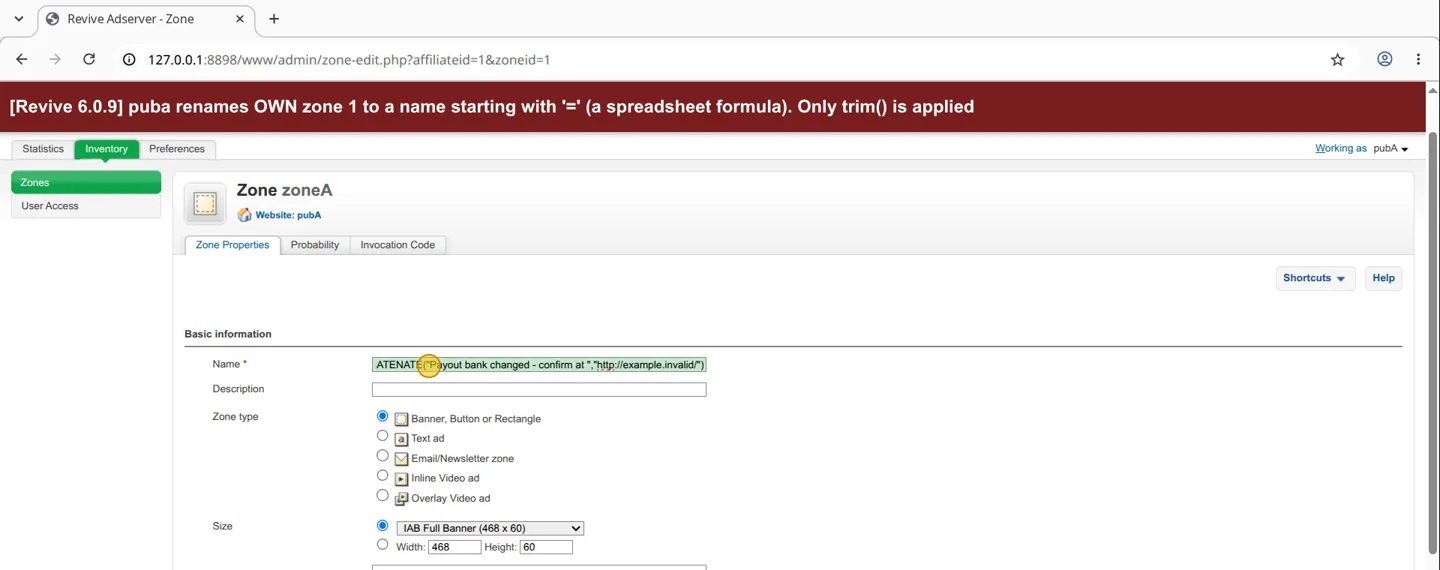
The website user renames their own zone. Only trim() is applied.
Then adva logs in, opens Advanced Reports and generates the Conversion Tracking report. In the downloaded file, the Zone Name cell is a live formula. The formula bar shows the =CONCATENATE(...), and the cell shows the text the formula produced, right next to the advertiser's own conversion data:
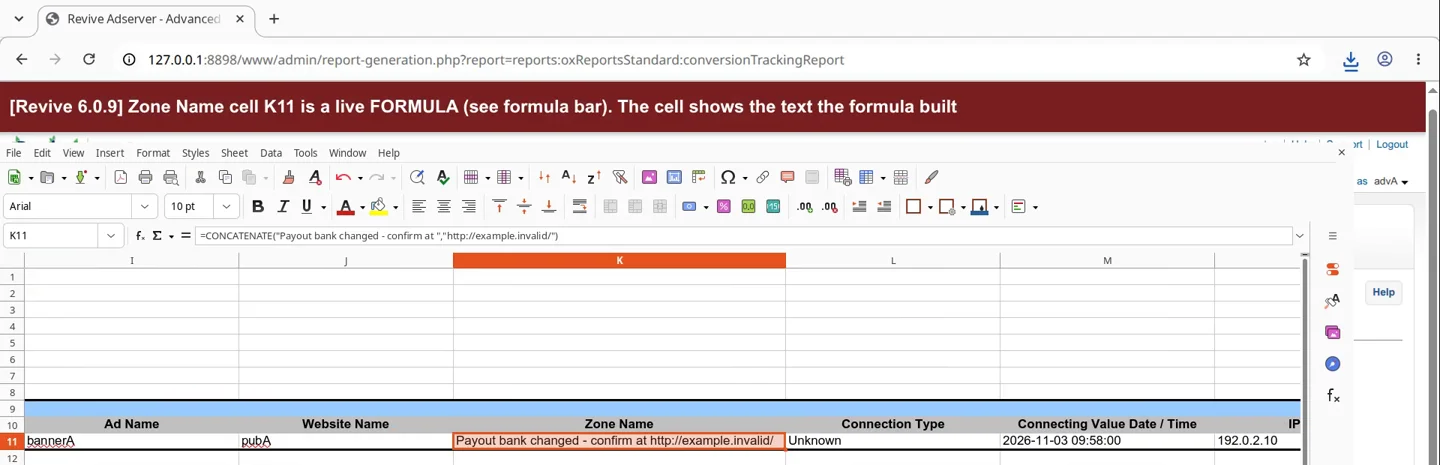
The advertiser's report: cell K11 is a formula planted by a user from another organisation.
In the same row, the Order ID tracker variable I had set to =1+1 came out as the text 1+1. That shows the 6.0.9 fix was active and simply did not cover this path. I find a control like that in the same row very useful in a report. It removes any doubt about whether the test install was patched.
To make sure this was not an artefact of my lab, I also ran the real report plugin code from the 6.0.9 tag and the 6.1.0 release candidate offline against the real writer, and dumped the BIFF records of the resulting file. The zone name cell was a FORMULA record, and the sanitised order ID a plain string record.
What it can and cannot do
This is where I tried to be careful not to oversell it. Formula injection reports often claim command execution through DDE or data theft through HYPERLINK and WEBSERVICE. I tested a matrix of payloads against the bundled writer:
=1+1,@SUM(1,2),=CONCATENATE(...),=INDIRECT(...)and=INFO(...)all became formulas.=HYPERLINK(...),=WEBSERVICE(...)and DDE payloads were rejected by the writer's own formula parser and written as plain error strings.+and-prefixes stayed text.
So the realistic impact is content spoofing inside a report the victim trusts: misleading values, or instructions like the fake "payout bank changed" text in the screenshot, built with formulas. There is no data exfiltration and no command execution. The advisory says the same. That is the same ceiling as the original CVE. Only the source of the input is different.
I scored it Low, CVSS 3.5. The vendor scored it Medium 4.1, because they set the scope as changed: the formula runs in the victim's spreadsheet application, not in Revive. That is a fair call.
The fix: neutralise the sink, not the field
In the report I suggested fixing it in the writer rather than adding sanitise() to more fields. A per-field fix misses the next field, and third-party report plugins would never get it at all.
That is what the Revive team did. In 6.1.0, the Excel writer writes ordinary text as literal string cells, and report plugins have to explicitly mark a cell as a formula or a hyperlink. Numbers are still written as numbers. One central change covers every report, including plugins that do not exist yet.
They sent the patch over HackerOne before the release and asked me to verify it, which I did against 6.0.9, the release candidate and master:
- The same payload matrix, pushed through report titles, parameters, section titles, headers and data rows, produced zero formula records and zero hyperlink records.
- The real Conversion Tracking report wrote the zone name as a string cell.
- The end-to-end lab run now shows the formula as literal text in K11.
- Nothing in core or the bundled plugins calls the new explicit formula or link helpers with user input, or writes to the worksheet directly. That was my main worry about a bypass.
I also pointed out two small non-security things. Empty values had become empty string cells instead of blank cells. And the old sanitise() was now redundant, while still stripping the = from legitimate tracker values. A follow-up patch fixed both, and I verified that one too.
Timeline
- 2026-11-11: Reported on HackerOne, shortly after 6.0.9 shipped the fix for CVE-2026-108563.
- 2026-11-12: Accepted, rated Medium 4.1. The vendor shared a patch, and I verified it the same day.
- 2026-11-22: Follow-up patch verified.
- 2026-11-23: The vendor confirmed the release date and asked me to request disclosure.
- 2026-11-25: Revive Adserver 6.1.0 released, REVIVE-SA-2026-005 published, and the report disclosed.
The Revive team was quick and pleasant to work with. It is a small open source project with no corporate backer, and they still turned around a report, a patch, a follow-up and an advisory in two weeks.
Takeaways
- A fresh CVE fix is a map. It tells you exactly which sink the maintainers consider dangerous. The next question is what else reaches that sink. Diffing a security release and then going the other way, from the sink back to every source, is one of the most reliable ways I know to find real bugs in mature code.
- Fix encoding problems where the output is produced. Escaping at the sink covers every input, including ones nobody has thought of yet.
- Be precise about impact. Testing what the bundled parser actually supported turned a hand-wavy "possible RCE via DDE" into a claim the maintainers could check and agree with.
I found this during a source review run of my bug bounty hackbot, triggered by the 6.0.9 release. Before it went into a report, it was reproduced in a local lab running the affected version. The evidence video in the report was recorded with the tooling from Recording PoC videos with Playwright, DevTools and Xvfb.